


Driving a Rental Car from Kahului to Kapalua: Route and Time
Updated: 3 days ago
Driving a rental car from the primary airport hub to the resort coastline takes an estimated 55 minutes one way when booking with Rental Car Maui™. That’s a useful starting point, but traffic and your departure time can affect the trip, so leave room in your plans rather than treating the estimate as a guarantee.
Wondering whether you really need a vehicle to get around the island? A car offers a direct route to your destination, while public transit also connects the main airport area with the northwestern coast. The right fit depends on your itinerary and how much flexibility you want. This guide explains the route and drive time, plus what to know about booking, parking, rental restrictions, fuel, and departure timing, so you can plan the trip with fewer surprises.
Table of Contents
Rental car booking and parking advice
Booking means reserving a vehicle for your travel dates and pickup location. For a Kahului arrival, decide where you’ll collect the car before comparing routes or parking plans. Keep your reservation details accessible, and match the pickup location to your arrival plans. The Kahului airport rental information can help you plan around an airport pickup.
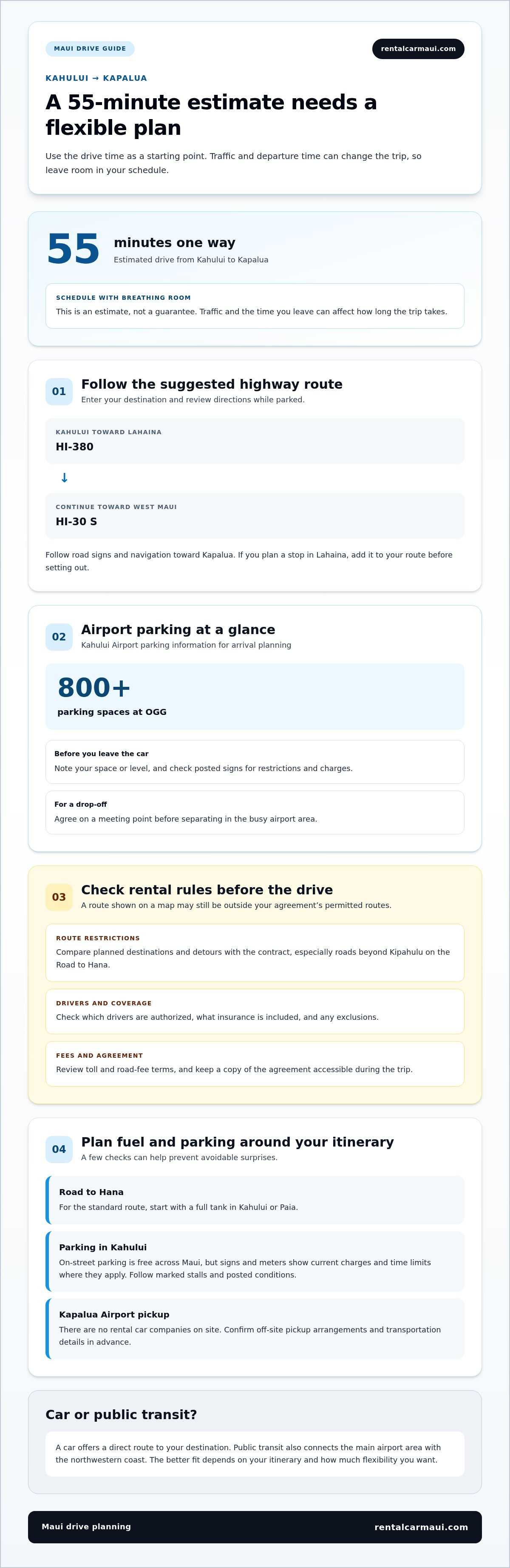
OGG parking is the airport parking area at Kahului Airport. It has over 800 spaces, giving drivers a place to leave a vehicle while handling airport travel. Before parking, note your space or level and check posted signs for restrictions. If someone is dropping you off, agree on a meeting point before separating in the busy airport area.
Parking in Kahului includes airport lots and on-street spaces. On-street parking is free across Maui, but signs and meters show current charges and time limits where they apply. Read the full sign before leaving the car; restrictions can vary by location. For example, don’t assume a space near a shop has the same rules as one near the airport.
Park only in designated spaces and follow the posted conditions. Check signs, meters, marked stalls, and time limits before walking away. Don’t block driveways, access points, or other vehicles. If the rules are unclear, choose a clearly marked space instead of risking a ticket or disrupting traffic.
Vehicle size affects how easily you can fit and maneuver in a parking space. A compact car may be easier to park in a tight stall, while a larger vehicle needs more room to turn. Consider your passengers, luggage, and expected parking options. At the airport or in central Kahului, follow stall markings and take extra care when reversing.
Kapalua Airport has no rental car companies on site. Rental pickup arrangements may be off-site, so confirm the details before planning your arrival. If you’re flying into Kapalua, arrange your rental and transportation to the pickup location in advance. That differs from collecting a car in Kahului.
For a Kahului pickup, keep the reservation, pickup location, and first parking stop together in your travel notes. In Kahului, follow posted parking instructions; near Kapalua Airport, arrange the rental and shuttle details directly. These simple steps help prevent confusion at the airport and make it easier to start your drive with a clear plan.
Rental agreement and road restrictions
Your rental agreement sets out who may drive and which roads are permitted. Read it before leaving the airport, then compare its restrictions with your planned stops around Maui.
Insurance and Driver Requirements
Rental insurance and driver requirements are the coverage terms and eligibility conditions in your rental agreement. In Hawaii, check the agreement for the coverage included, any exclusions, and which drivers are authorized. Review the driver requirements before pickup, and make sure each person who may drive is named or otherwise permitted under the contract. These terms answer what applies to your rental.
Toll Roads and Road Fees
A toll road charges drivers to use a road, while other road fees may follow separate terms. For the Kahului-to-Kapalua trip, review the agreement’s toll, road-fee, and payment provisions before departure. If a route or service carries a charge, the agreement explains how it is handled. Keep those terms with your travel records so you can distinguish road charges from rental charges.
Your rental agreement determines which roads you may drive. Check that it permits your planned route, especially if your itinerary includes the Road to Hana beyond Kipahulu. This restriction matters even if your trip begins with the drive from Kahului to Kapalua. A road shown on a map may still be outside the permitted routes.
Before setting out, compare each planned destination with the route rules in your contract. If your itinerary includes Hana or Kipahulu, read the restriction carefully rather than relying on a map’s suggested route. Make the same check before adding an unpaved road, remote stop, or detour. Permission for one Maui route doesn’t automatically cover another.
Use a simple pre-drive review:
Identify the roads and destinations on your itinerary, including any planned detours.
Find the agreement’s route restrictions and compare them with your plans.
Check who is authorized to drive and what insurance terms apply.
Keep a copy of the agreement accessible during the trip.
At airport pickup, it’s easy to focus on collecting the keys and starting the drive. Take a moment to review the route restrictions before leaving Kahului. If your agreement excludes a planned road, adjust your itinerary to stay within its terms. A clear plan also helps every authorized driver follow the same limits.
For the drive from Kahului to Kapalua, focus on permitted routes, insurance terms, and authorized drivers. For a longer island itinerary, check every destination, especially Hana and Kipahulu, before choosing a route. Keep your rental agreement in mind whenever your plans change.
Driving time from Kahului to Kapalua
The estimated drive from Kahului to Kapalua takes 55 minutes one way. Treat that as a starting point for your schedule, not the whole day’s travel time.
Driving Route
The driving route is the road connection between Kahului and Kapalua. For anyone driving a rental car from Kahului to Kapalua, the suggested route heads toward Lahaina on HI-380, then continues toward West Maui on HI-30 S.
The route from Kahului to Lahaina follows roads toward West Maui. From Lahaina, continue toward Kapalua by following road signs and your navigation directions. Enter your destination before departure and review the route while parked. This helps you recognize the named highways and avoid making route decisions while driving.
If you plan to stop in Lahaina, add the stop to your navigation before setting out. A one-way route estimate doesn’t include parking or time spent visiting. Plan for the full outing: departure, breaks, arrival in Kapalua, and the return drive if you’re heading back to Kahului.
Other Kahului estimates can help put the trip in context. Maalaea is estimated at 15 minutes one way, and Kaanapali at 45 minutes one way. Kapalua’s 55-minute estimate is also one-way. These comparisons help show how destinations differ along Maui’s west side, but each estimate describes its own direct trip.
Driving Conditions and Hazards
Driving conditions are the traffic and road circumstances that affect travel time and the drive itself. On Maui, driving times vary depending on the time of day, so the 55-minute estimate may differ from your actual trip.
For driving a rental car from Kahului to Kapalua, allow schedule flexibility around your departure time. Follow posted signs, keep your attention on the road, and avoid rushing if traffic slows near Lahaina. If you’re unfamiliar with HI-380 or HI-30, review the route before leaving rather than trying to study directions while moving.
A planned stop or changed destination can affect your arrival time. Add each stop to your route before departure, then review the updated directions. If a suggested detour takes you beyond your original plan, compare it with your rental agreement’s restrictions before continuing. This keeps your route aligned with the terms you reviewed in Kahului.
For a Kapalua appointment or check-in, work backward from the arrival time and leave room for the return journey separately. The 55-minute estimate covers one-way driving only; it doesn’t include a stop, parking, or other airport tasks. A clear route and a realistic schedule make the drive easier to manage without treating an estimate as a fixed arrival promise.
Fuel and timing before leaving Kahului or Paia
A fuel plan is deciding where to start with enough fuel for your route and return. For a Kapalua trip, check the gauge before leaving Kahului, then consider your planned stops and onward travel. The full-tank advice for the standard Road to Hana route is specific to that longer itinerary, not a separate requirement for the Kahului-to-Kapalua drive.
Keep enough fuel available to accommodate changes to your plans. Avoid setting out with a nearly empty tank, and consider your route, extra stops, and return journey. A direct drive to Kapalua differs from a day that includes several West Maui stops.
Use this quick check before leaving:
Look at the fuel gauge and note whether the car starts with a full tank.
Set Kapalua as the destination and review your planned stops.
Consider whether your plans include returning to Kahului or continuing elsewhere.
Leave time to refuel before departure if your fuel level doesn’t suit the itinerary.
Kahului and Paia are useful starting points for Maui drives, but fuel planning depends on your route. For the standard Road to Hana, start with a full tank in Kahului or Paia. That guidance is specific to the Hana route. For Kapalua, plan your fuel around your own route and stops.
Choose a departure time that fits your schedule, allowing for changes in Maui driving times. Plan around your arrival needs rather than relying solely on a route estimate. If you have a Kapalua check-in or meal reservation, leave a buffer for the drive and any planned stops.
Before a morning departure from Kahului, confirm your destination, set your navigation, and check the fuel gauge while parked. If you’re starting in Paia, do the same before joining your route. Making these decisions before driving helps you focus on the road.
Reassess your route and fuel if you add a stop after leaving Kahului. If your day includes both Kapalua and another destination, plan the full sequence rather than treating each leg separately. Allow for the return trip, too. Keeping a fuel reserve gives you flexibility if a stop takes longer or your route changes.
For the Road to Hana, start with a full tank in Kahului or Paia. For Kapalua, check your gauge and plan around your route and stops. Choose a departure time that fits your schedule, then set navigation and check fuel before pulling away.
How driving times can vary
Driving-time variation is the difference between an estimated trip and the time your journey actually takes. On Maui, driving times vary by time of day, so plan around your schedule instead of treating a route estimate as an exact arrival time.
For the drive from Kahului to Kapalua, plan for the whole outing, not just time on the road. A stop in Lahaina, a meal break, or a changed destination adds time beyond the direct drive. Set your arrival target, then work backward and leave room for planned stops.
Traffic conditions can shift throughout the day. Before leaving Kahului, review your route and target arrival time. If your schedule is flexible, choose a departure that leaves room for adjustments. For a fixed appointment in Kapalua, build in a buffer rather than aiming to arrive at the last minute.
Stops add time even when your route stays the same. A visit in Lahaina, for example, requires time to park, spend time there, and rejoin the route. A quick stop and a longer visit affect your schedule differently. Add each planned stop before setting off instead of relying on the direct-drive estimate.
A route change can also affect your schedule. If you add another West Maui destination, check the full sequence in your navigation before departing. Compare it with your original plan and allow for the extra time shown. Don’t apply a direct Kahului-to-Kapalua estimate to a multi-stop itinerary.
Use these steps to build a practical schedule:
Set Kapalua as your first destination and note the estimated arrival.
Add each planned stop, such as Lahaina, before leaving Kahului.
Choose a departure time that leaves flexibility around appointments.
Review the return route separately if you’re heading back to Kahului.
Plan the return drive separately. A one-way estimate doesn’t include the journey back, parking, or stops along the way. If you’re returning to Kahului for a flight, allow time for airport tasks as well. Planning the outbound and return legs separately makes it easier to see how much time your day allows.
For a more flexible travel day, keep one optional stop rather than filling every part of the itinerary. That way, a change in your departure time or a longer visit in Lahaina doesn’t force you to rush the rest of the drive. Plan your rental car for Maui travel alongside the route and schedule.
Rental Car Maui™: Airport Car Rental
Rental Car Maui™ offers airport car rental for travelers driving from Kahului toward Kapalua. A rental gives you flexibility to plan your stops, return journey, and departure time. For a longer stay, long-term rentals may suit your needs; affordable older cars are another option.
Choose the rental period and pickup plan that fit your Maui itinerary, then keep your route, fuel plan, and agreement terms together before setting out. If your trip begins at Kahului Airport, explore the airport car rental details as you plan.
Visit Rental Car Maui™ to learn about airport car rental and plan your next step.
Make Your Maui Travel Plans Your Own
Your journey can be more than a drive between Kahului and Kapalua. Plan around the places you want to visit, your group’s preferred pace, and how long you need a vehicle. Driving a rental car from Kahului to Kapalua lets you shape the day around your itinerary.
Rental Car Maui™ offers airport car rental, cruise port car rental, and long-term car rental options. Choosing the rental arrangement that fits how you arrive and how long you’re staying can make planning the rest of your trip feel more straightforward. Keep your pickup details and driving plans together, and you’ll be ready to set out on your own schedule.
For help planning a rental around your Maui trip, contact Rental Car Maui™. Your next West Maui drive can start with a plan that feels right for you.
Frequently Asked Questions
How to Get Around Maui: Do You Really Need a Rental Car?
No, you can get around parts of Maui without renting a car. Maui Bus route #29 connects Kahului and Wailuku with Māʻalaea, Lāhainā, Kāʻanapali, and Kapalua. A rental car can suit travelers who want to set their own schedule or add stops beyond those connections. Compare your planned destinations with the bus route, then decide whether public transport or a car better fits your itinerary.
How far is it to drive from Kahului Airport to Kapalua, Maui?
The drive from Kahului Airport to Kapalua is estimated at 55 minutes one way. For planning, follow the route from Kahului toward Lahaina, then continue toward Kapalua. Your actual travel time depends partly on when you leave. If your plans include a stop before reaching Kapalua, account for that separately so your arrival schedule reflects the whole outing, not just the direct drive.
How long does the drive from Kahului to Kapalua take in normal traffic?
Allow about 55 minutes for the one-way drive, based on the listed estimate. Maui driving times vary by time of day, so use the estimate as a planning guide rather than a fixed arrival time. For a dinner reservation or check-in, plan to arrive with time to spare. Add separate time for a return to Kahului, since the estimate covers only one direction.
Where can you get gas between Kahului and Kapalua?
Before leaving Kahului, plan a fuel stop using a current map and choose a station that fits your route. This is easier than waiting until the gauge is low. If you’re starting in Paia, check the gauge before setting out and plan around the road ahead. Allow time for fuel stops, especially if you have a fixed arrival time.
Are there restrictions on rental cars driving to Kapalua or nearby roads?
Check that your rental agreement permits the roads on your itinerary. In particular, review its restrictions before driving the Road to Hana beyond Kipahulu. For a detour from Kapalua, check the specific road against your rental terms rather than assuming that permission for one route applies to every Maui road.


